Wzdom Privacy — Free Beta
See every connection your computer makes. In real time.
Wzdom Privacy monitors every network request your apps make — trackers, data brokers, telemetry, phishing domains — and explains each one in plain English. 100% on your device. No account required.
Complete Coverage
Network monitoring. DNS blocking. Data broker detection. One app.
Most privacy tools do one thing. Wzdom Privacy does all three — and does each of them 100% on your device.
Real-time network monitor
See every connection the moment it happens. App name, destination domain, risk classification. Every outbound request your machine makes, visible and explained. Nothing is hidden from you because nothing is filtered before you see it.
DNS-level threat blocking
Block known trackers, malware, and phishing domains before they connect. More than 4,600 domains updated daily from DuckDuckGo Tracker Radar and Disconnect.me. Blocking happens at the DNS layer — before data can leave your machine.
Data broker identification
Wzdom identifies connections to known data broker infrastructure — companies like Acxiom, LiveRamp, and Spokeo — and flags them clearly. Know when your apps are talking to companies whose entire business is selling information about you.
How Wzdom Compares
Most privacy tools only solve one piece of the problem.
Paid firewalls show you connections but miss data brokers. Free firewalls are Mac-only. DNS filters block domains but can't identify which app made the request. Wzdom Privacy is the only free tool that covers all three layers — on macOS.
| Feature | Wzdom Privacy | Paid Firewall | Free Firewall | DNS Filter |
|---|---|---|---|---|
| Price | Free (beta) | $59 | Free | $2/mo |
| macOS | Yes | Yes | Yes | Yes (DNS only) |
| Windows | Yes | No | No | Yes (DNS only) |
| Real-time network monitor | Yes | Yes | Yes | — |
| DNS blocking | Yes | — | — | Yes |
| Data broker detection | Yes | — | — | — |
| 100% on-device | Yes | Yes | Yes | No (cloud DNS) |
| AI-powered classification | Yes | — | — | — |
Comparison based on publicly available information as of Q2 2026. Wzdom Privacy is in active beta — features may evolve. Category descriptions reflect typical capabilities of each tool type.
Competitor pricing sourced from publicly available pricing pages as of May 2026. Prices may vary.
Ready to see what your apps are sending?
Join privacy-conscious users on macOS who already run Wzdom Privacy every day.
Download free — macOSNo account required. Free during beta.
What's Inside
Built for people, not security teams.
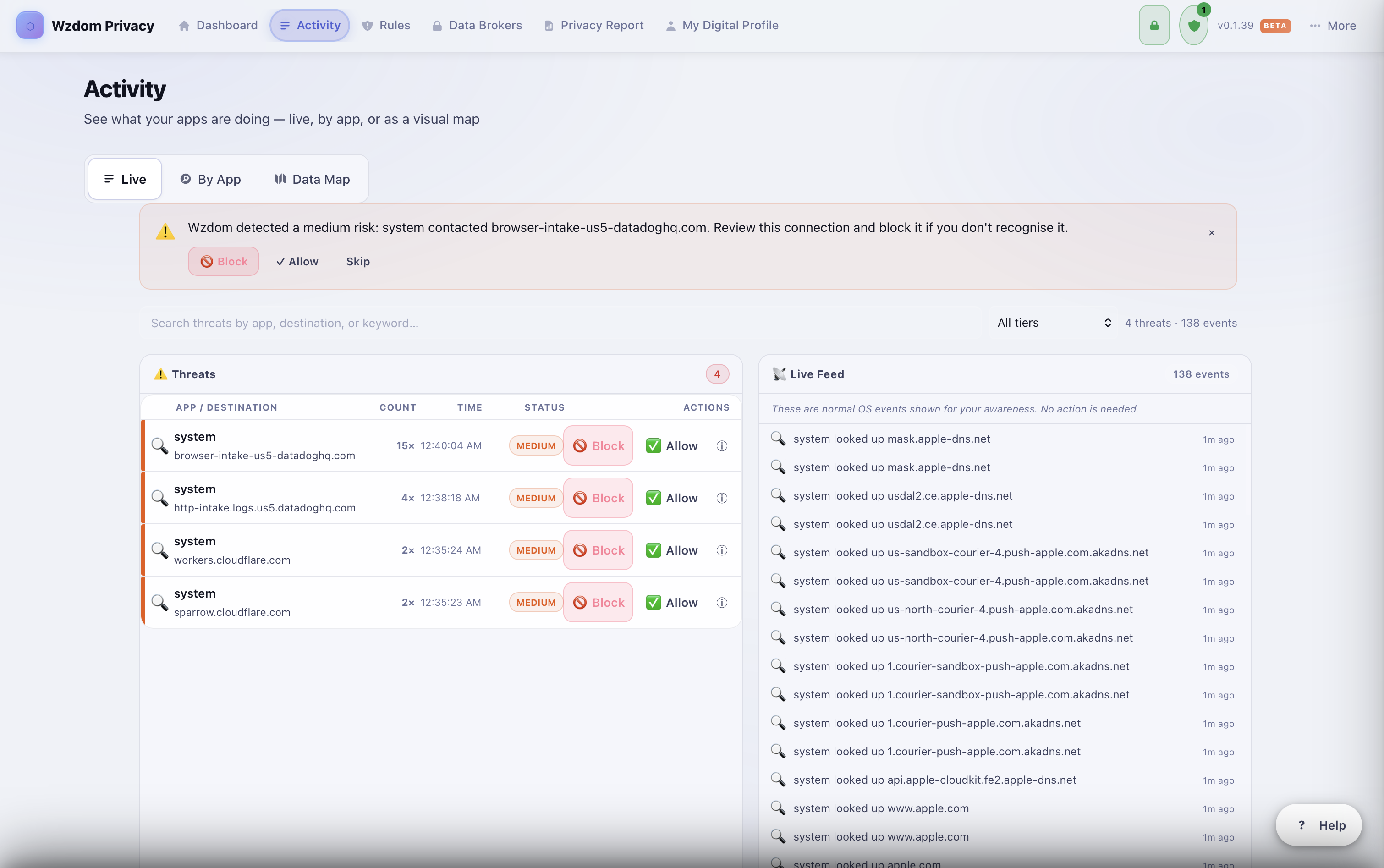
01 — Live Connection Feed
See every app, every domain, in real time.
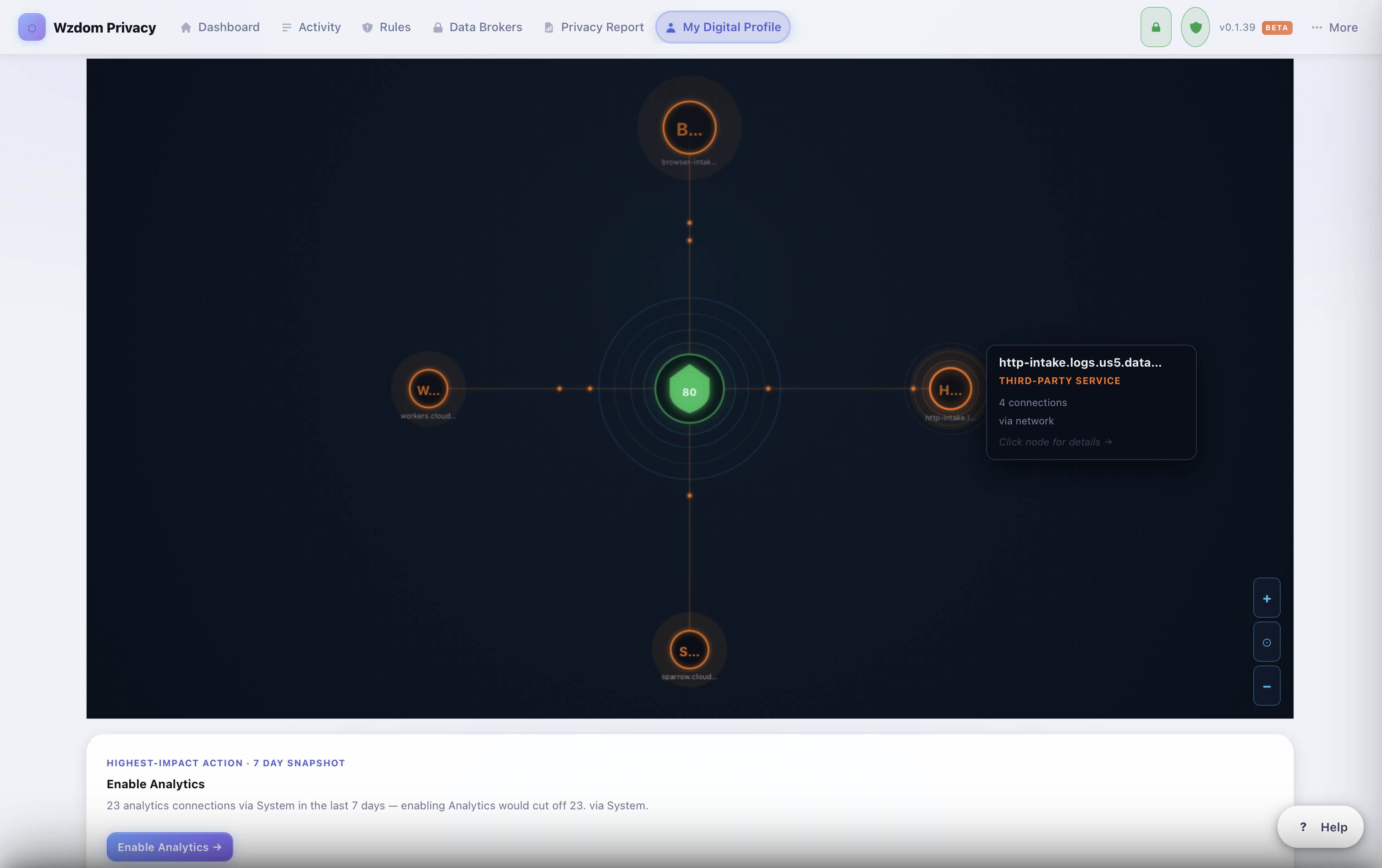
Every outbound request from every app, classified the moment it happens. You see the app name, the destination, and a plain English label: Tracker, Data Broker, Phishing Domain, Safe CDN, Telemetry. No cryptic IP addresses, no jargon. The Data Map view shows your entire network footprint as a visual bubble chart so you can spot patterns at a glance.
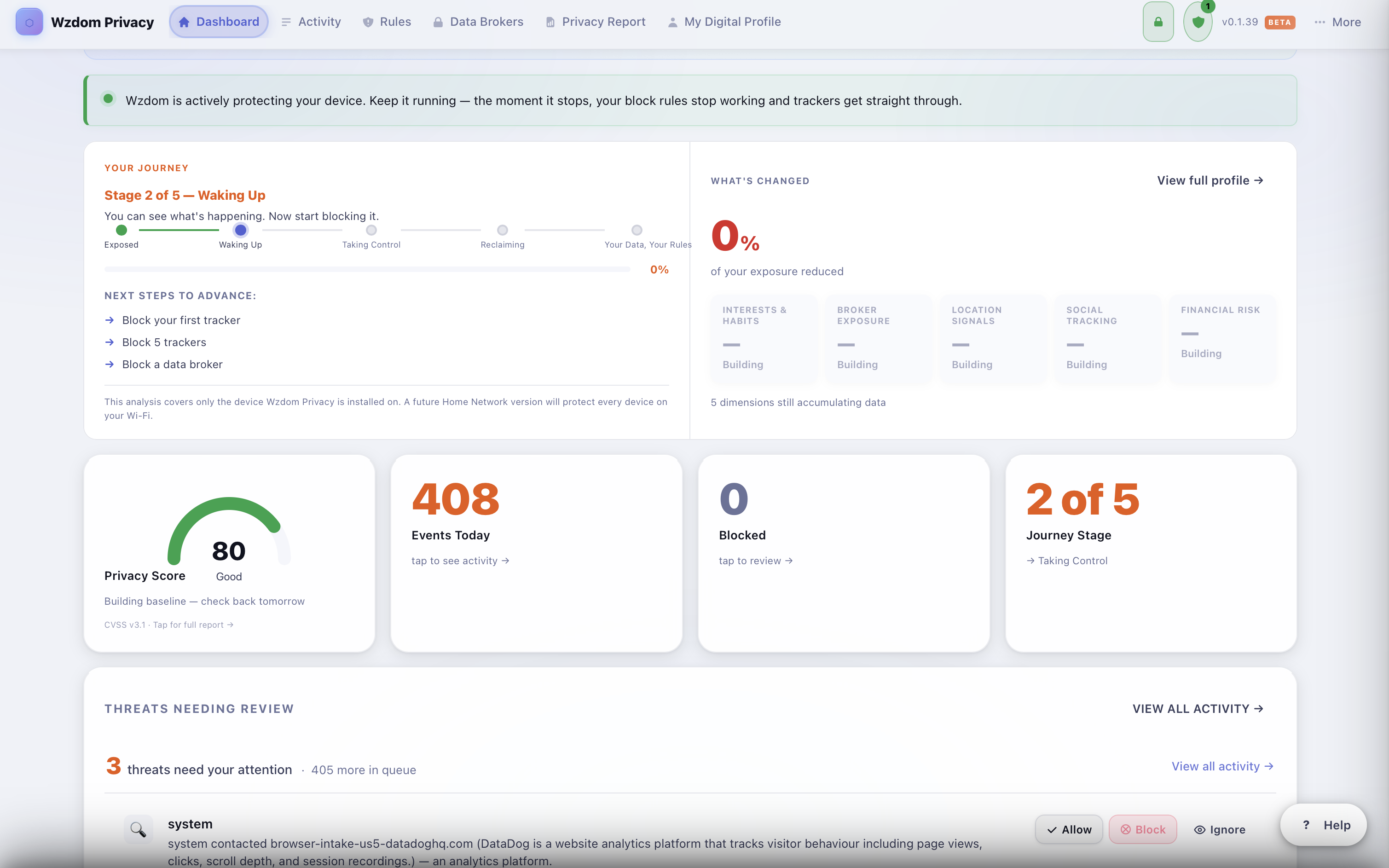
02 — Privacy Dashboard
Your privacy at a glance. Always.
The dashboard shows you everything that matters: how many events were monitored today, how many threats were blocked, and where you are in your Digital Life Journey. Your Privacy Score tracks how well you are protected across five dimensions. No configuration required. Open the app and it is already working.
03 — Digital Life Journey
From exposed to sovereign. One step at a time.
Privacy is not a switch. It is a process. Wzdom guides you through five stages from Exposed to Your Data, Your Rules. At each stage the app tells you exactly what to do next. See how many companies have been cut off, how many data brokers you have opted out of, and what is still working against you.
04 — Full Control
Block, allow, or flag. Every decision is yours.
Click any connection to get a plain English explanation of what that destination does and why it matters. Then decide: block it permanently, mark it safe, or flag it for review. Wzdom never acts without your explicit input. Every rule you create is stored locally and applied instantly to every future connection from that domain.
This is a Google advertising network. It tracks which websites you visit across the web and builds a profile of your interests for targeted advertising.
05 — AI Shield Coming in v0.2
Use AI tools without handing them your life.
AI Shield monitors traffic to ChatGPT, Gemini, and Copilot and automatically removes personally identifiable information from your prompts before they leave your machine. You get the answer. The AI service never sees who asked.
Before AI Shield
My name is Sarah Chen and my SSN is 482-90-1156. Can you help me understand my tax return?
↓ AI Shield removes PII on device
Sent to AI service
My name is [name removed] and my SSN is [SSN removed]. Can you help me understand my tax return?
Privacy by Design
We can't collect your data because we have nowhere to put it.
The most credible privacy guarantee is structural, not contractual. We designed Wzdom Privacy so that collecting your data is architecturally impossible — not just against our policy.
No cloud
All data lives in an encrypted local database on your machine. The encryption key never leaves your device. There are no Wzdom servers receiving your connection logs, your domain lists, or your browsing patterns. Nothing to breach. Nothing to subpoena.
No account
There is no user profile, no login, no database of customers to be hacked or sold. You install the app. It works. We have no way to identify you, no email address on file, and no record linking your machine to your identity. The first Wzdom product you use should not itself be a privacy risk.
No telemetry
Wzdom Privacy does not phone home. The only outbound connections it makes are to fetch updated threat definitions and you can turn that off entirely from settings. We do not collect crash reports, usage analytics, or feature metrics. We do not know how many people have Wzdom open right now.
Got questions?
Frequently asked questions
-
Yes. Wzdom Privacy is available for macOS 11 Big Sur and later, and Windows 10 and Windows 11. Both versions are free during beta. Download once and it runs immediately with no account setup required.
-
Yes. Wzdom blocks trackers, ad networks, telemetry endpoints, and phishing domains at the DNS level. This means blocking happens before a connection is even established, covering every app on your machine, not just your browser. You can also create custom block and allow rules for any domain.
-
No. Wzdom Privacy is designed so that collecting your data is architecturally impossible. There is no cloud backend, no user account, and no telemetry. All connection logs and analysis stay on your device in an encrypted local database. We have no way to identify you and no record of what you do on your machine.
-
Little Snitch is an excellent firewall that focuses on per-app connection approval. Wzdom Privacy goes further in three areas: plain-English explanations of what each connection actually means for your privacy, built-in data broker detection that identifies companies profiting from your data, and a visual Data Map that shows your full network footprint at a glance. AI Shield, which will protect your AI queries, is coming in a future release.
-
Yes. Wzdom Privacy monitors all network traffic including connections to AI services such as ChatGPT, Gemini, Claude, Copilot, and others. You can see exactly when those services are contacted, which app triggered the connection, and how frequently. AI Shield, which will automatically strip personal information from your AI queries before they leave your device, is coming in a future release.
-
Yes, Wzdom Privacy is completely free during the beta period. Core features including live connection monitoring, DNS blocking, data broker detection, and the Digital Life Journey are all available at no cost. Future paid tiers will add features for power users and teams but the core privacy protection will always have a free option.
-
The Digital Life Journey is a guided experience inside Wzdom Privacy that helps you understand your current privacy exposure, discover which companies have profiles on you, and take concrete steps to reduce your digital footprint. Your Digital Profile is a living dashboard that shows the trackers, data brokers, and threat categories connected to your online activity, all built from the traffic Wzdom observes on your own device with nothing sent to our servers.
Download free. No strings.
Available now for macOS 11+ and Windows 10/11. Free during beta.
Download Wzdom Privacy — Free